
- Published on
TikTok Live Watch Time Is Very Low? Fix Retention Fast
- Authors

- Name
- Robin
- Core Pain Point: Average watch time in the livestream is extremely short, with viewers "joining and leaving instantly," causing the algorithm to judge the content quality as poor and stop distribution.
- Search Intent: How to improve TikTok Live retention, why can't I keep viewers in my live, tips for increasing live watch time.
- Key Conclusion: Low watch time usually isn't because the traffic isn't "targeted," but because viewers don't get a clear "reason to watch" within the first 5-15 seconds. By optimizing text promises at the top of the screen, establishing a 60-second interaction loop script, and designing clear interaction tasks (e.g., "change game at 1k likes"), you can quickly pull up the retention curve.
High-retention live setup: Using clear on-screen promises and interaction loops to keep viewers watching.
Introduction
Source discussion: “My TikTok Live watch time is very low — people join and leave instantly.” — r/TikTokCreators. The replies usually land in the same place: the Live starts too slow, the screen is unclear on mobile, and there’s no “loop” that keeps new people watching.
If you’re staring at analytics that show tiny average watch time (seconds… maybe a minute), this is the helpful reframe: TikTok isn’t punishing you. TikTok is sampling your Live, and viewers are leaving before the platform has a reason to keep testing you.
This post is a practical “mistakes → corrections” guide you can apply today.
What “Low Watch Time” Usually Means on Live
TikTok Live retention typically breaks in one of three places:
- The promise isn’t obvious: viewers can’t tell what’s happening.
- The start is dead: you’re waiting for people to arrive.
- The room has no job: nobody knows what to do (tap, vote, type, stay).
You don’t fix this by “being more consistent.” You fix it by building a first-minute experience that makes sense to a stranger.
Mistakes & Corrections (The Retention Fixes)
Mistake 1: Starting with “Hey guys…”
When the first 10 seconds are a soft greeting, most viewers bounce. They don’t know why they should stay.
Correction: Put the promise on screen, immediately.
- Add a short overlay text at the top: “Chat chooses my next move” or “Ask me anything about X”
- Say the promise out loud in one sentence: “You’re here at the perfect time—chat is deciding my next challenge.”
- Restate it every 60–90 seconds for new joiners
Mistake 2: Treating Live like a podcast
Talking at people is fine for your regulars. For new viewers, it’s easy to leave because nothing is asking them to engage.
Correction: Use one simple loop.
Pick one interaction loop you can repeat every 2–3 minutes:
- Vote loop: “Type A or B. We lock in at 10 votes.”
- Reward loop: “Every 100 likes = I do the next step.”
- Goal loop: “We’re trying to hit X by the end of the hour.”
The loop is the content. Your topic is the background.
Mistake 3: Your screen is unclear on mobile
On mobile, TikTok UI covers your bottom area. Small text, busy overlays, and wide framing kill clarity.
Correction: Design for the top third of the screen.
- Put the main hook text near top-left/top-center
- Use fewer elements: your face + one hook line + one goal
- Keep lighting bright and the subject large enough to recognize instantly
Mistake 4: Your first minute has no momentum
The first minute is where TikTok learns whether to keep distributing your Live. If the first minute is “waiting,” your analytics punish you.
Correction: Use a 60-second start script.
Use this as a baseline:
- 0–10s: Say the promise (one sentence).
- 10–25s: Ask a binary question (A/B).
- 25–40s: Name what you’re doing right now.
- 40–60s: Repeat the question + set a micro-deadline (“We decide in 30 seconds.”).
Run this even if there are 0 viewers. Your first viewers arrive mid-sentence, not mid-silence.
Mistake 5: The Live “topic” is too broad
“Just chatting” or “Gaming” is not a reason to stay. It’s a category.
Correction: Narrow the frame to one specific outcome.
Better examples:
- “Chat coaches me through one ranked match”
- “I review your profiles live (drop @)”
- “I’m building X from scratch—vote on the next step”
The Watch-Time Ladder (Visual)
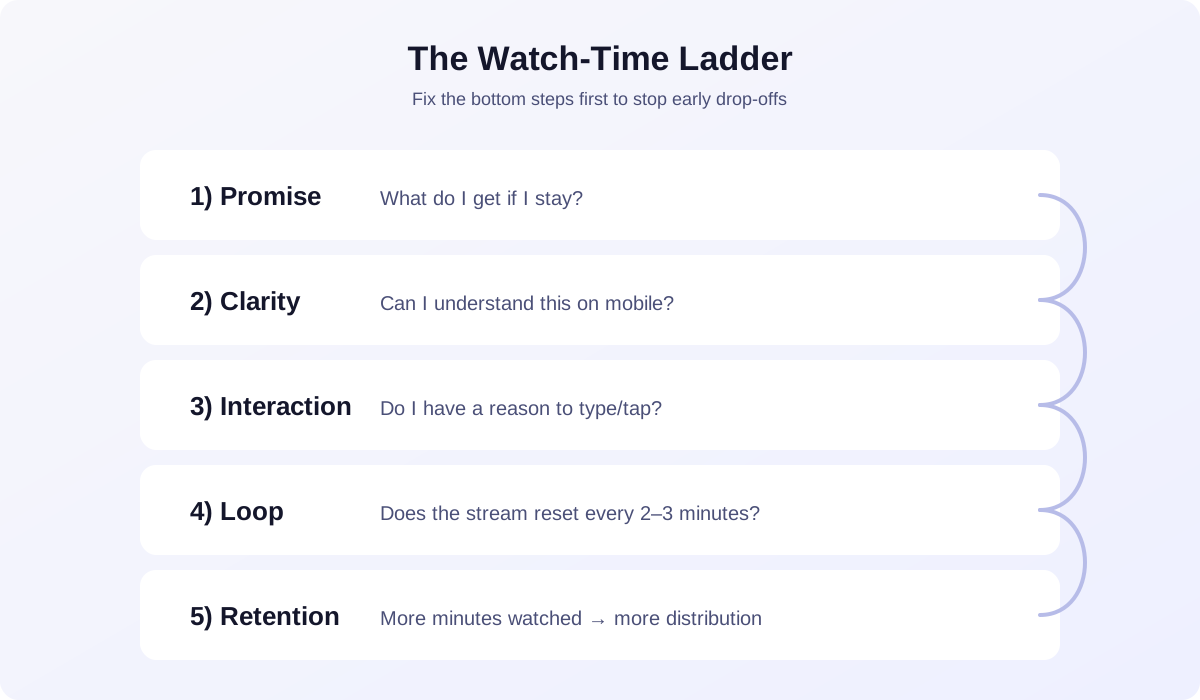
Low watch time usually breaks early (promise/clarity). Fix those first, then improve interaction and loops.
Actionable Checklist: 30-Min Retention Reset
- Write a one-line promise: “You’ll get X in Y minutes”
- Put that promise on-screen (top area, big font)
- Pick one interaction loop (vote, reward, goal)
- Script the first 60 seconds and run it immediately
- Reduce overlays to 2–3 essentials for mobile clarity
- Repeat the promise every 60–90 seconds for new joiners
- End with a clean loop reset: “New round starts now—A or B?”
FAQ
What’s a “good” TikTok Live watch time?
It depends on your niche and format, but if your average watch time is seconds, you have a first-15-seconds problem. Aim to consistently keep new joiners long enough to see one interaction loop complete.
Why do viewers join and leave instantly?
Most viewers leave because they don’t understand what’s happening, the audio is unclear, or there’s no immediate reason to interact. Clarity + a simple loop fixes most of this.
Should I restart my Live if watch time is bad?
Restarting can help if you had a scuffed start (silent, wrong scene, bad audio). But long-term, a strong first-minute script matters more than restarts.
Does low watch time hurt reach?
Yes. Watch time is a retention signal. If viewers bounce fast, TikTok tests you less. If you keep people longer, TikTok has a reason to keep sending new viewers.
Practical Conclusion
Low TikTok Live watch time is fixable without changing your entire niche. Treat your Live like an experience built for strangers: make the promise obvious, build a loop that creates participation, and script your first minute like it matters—because it does.