
- Published on
TikTok Live Gaming: 3 Truths to Fix a 'Dead Chat' and Boost Engagement
- Authors

- Name
- Robin

Address the 'dead chat' phenomenon where viewer count is high but interaction is low. Use psychological hooks and pacing to activate lurkers and create a vibrant atmosphere.
Core Pain
High viewer count but a silent chat, making you feel like you're talking to ghosts without any feedback.
Search Intent
TikTok Live dead chat fix, increase live engagement, breaking passive viewing habits.
Key Conclusion
TikTok Live is more like a TV channel. You must use 'low-cost hooks' and 'pattern interrupts' to shift viewers from passive to active mode.
Introduction
Your viewer count shows 40, 70, or even 100 people. You're hitting insane clips, the gameplay is smooth, but the chat is... dead silence. No "GGs," no questions, not even a hater.
It feels like you're streaming to a room full of ghosts.
In the Reddit r/gamestreaming community, this is the #1 source of "creator paranoia." You start wondering if the numbers are fake, if the algorithm is broken, or if you're just inherently boring.
The truth is: TikTok Live is not a community hub; it's a TV channel. If you want people to talk, you have to stop being a "performer" and start being a "host."
The "Passive Viewing" Trap
The biggest mistake gaming streamers make is bringing Twitch or YouTube expectations to TikTok. On those platforms, people are usually specifically looking for a creator. On TikTok, they stumble upon you while scrolling.
They are in "Lean Back mode." They treat your gameplay as background noise while doing something else, or they're just waiting for the next dopamine hit.
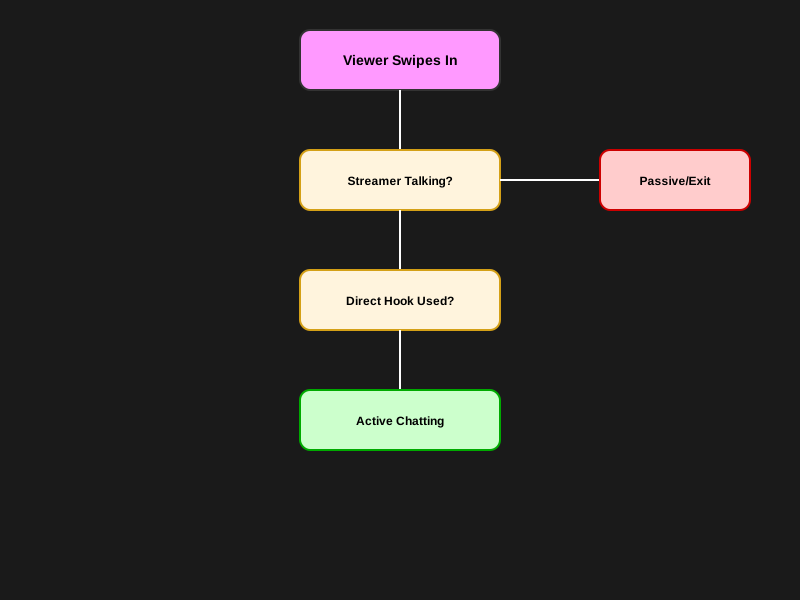
Engagement Gap Flowchart: Shifting viewers from passive browsers to active participants.
Why They Stay Silent
1. The "TV Effect" of High-Intensity Games
If you're playing high-intensity games like Call of Duty or Valorant, viewers are glued to the action. They don't want to look down at their keyboard and miss a headshot.
- The Fix: Utilize "low-stakes moments" (loading screens, looting phases) to ask specific, non-gaming simple questions.
2. "Audience Mismatch" from Algorithmic Pushing
Sometimes TikTok pushes your gaming live to people who don't even play the game. They might like your "vibe" or "visuals" but have nothing to say because they don't understand the mechanics.
- The Fix: Check your Live Analytics. If "Viewer Interests" don't match your game, you need to use more specific tags (e.g., use #ValorantTips instead of generic #Gaming).
3. You Aren't Asking "Answerable" Questions
"How's everyone doing?" is a terrible question. It's too broad and requires too much effort to answer.
- The Fix: Use binary or low-cost "hooks."
- Wrong way: "What do you guys think of this new update?"
- Right way: "Type 1 if this skin is mid, type 2 if it's fire."
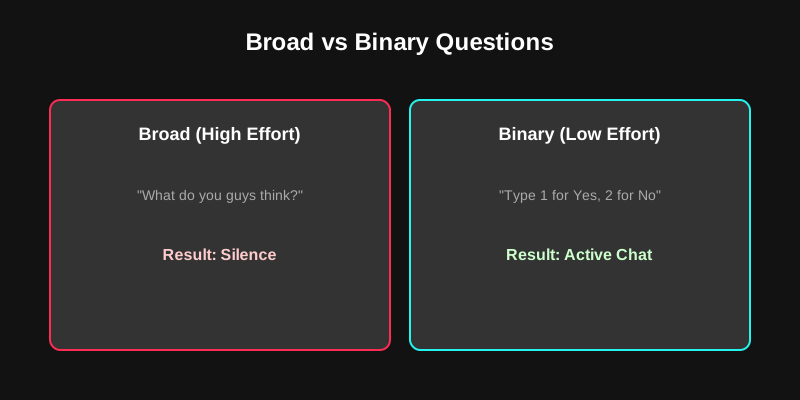
Interactive Chat Strategy Comparison: Binary questions and hooks are the fastest way to revive a dead chat.
"Active Chat" Checklist
If your stream feels cold right now, execute these three steps immediately:
- The 30-Second Rule: Never go more than 30 seconds without speaking. Even if you're just narrating your thoughts ("I'm going to rotate left because...").
- "One Question Per Minute": Pin a comment with a simple, polarizing question. Example: "Is [Game Name] dying? Yes or No?"
- Precise Feedback: When someone actually joins or likes, don't just say "thanks for the likes." Say "Hey [Username], I see you! Are you a [Game] veteran or just scrolling past?" Give them a reason to reply.
FAQ
Q: Is my viewer count fake? A: Most likely not. TikTok counts everyone who stays for more than a few seconds. Many are "lurkers" who have the volume low and aren't ready to chat yet.
Q: Does a cold chat affect my reach? A: Yes. TikTok's algorithm prioritizes "Engagement Rate." If people just watch without chatting, liking, or sharing, TikTok will eventually stop pushing you to the FYF (For You Feed).
Q: Should I use a "Chat Box" overlay? A: Yes. Seeing their name appear on screen via Tikfinity or OBS (Twitch-style) provides dopamine feedback and encourages more people to join the conversation.
Conclusion
A "dead chat" doesn't mean you're a bad streamer; it means your interaction loop is broken. On TikTok, you're not just playing a game; you're hosting a party. If the host stays in the kitchen (the game) and never talks to the guests (the chat), the guests will eventually leave.
Stop staring at your kill feed and start focusing on your "question hooks."