
- Published on
TikTok Live vs. Twitch Latency: The Structural Difference (2026)
- Authors

- Name
- Robin
TL;DR
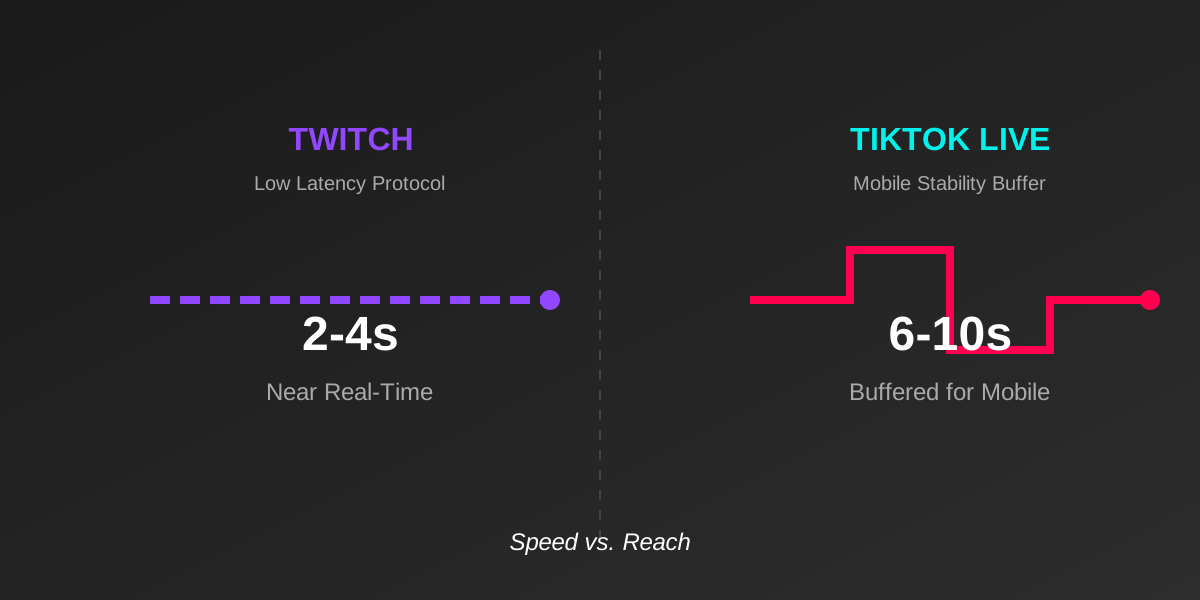
If your chat feels "slow" on TikTok compared to Twitch, it's not your internet. It's the architecture. Twitch uses Low Latency HLS (2-4s) optimized for desktop fiber. TikTok uses a buffered mobile stack (6-10s) optimized for 4G/5G stability. You cannot fix this with settings; you must adapt your content pacing.
The "Chat Lag" Complaint
On r/streaming, the complaint is constant:
"I ask a question, and chat answers 10 seconds later. On Twitch, it was instant. Is my OBS broken?"
No. Your OBS is fine. You have just moved from a Real-Time Platform (Twitch) to a Distribution Platform (TikTok).
The Structural Difference
Twitch and TikTok are built for different goals.
- Twitch Goal: Instant reaction (Squad Comms, Speedruns).
- TikTok Goal: Zero buffering on a subway train (Stability, Reach).
The Twitch Stack
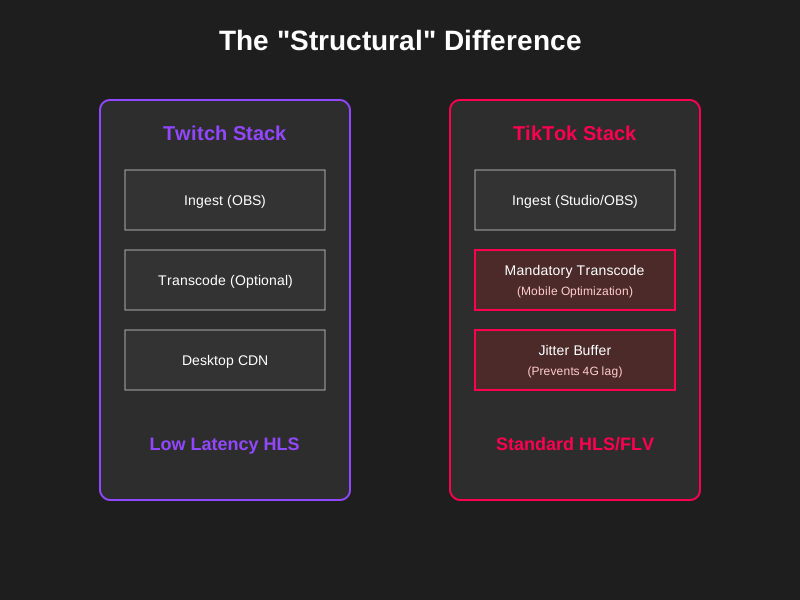
Twitch invested millions in a custom "Low Latency" protocol. They assume their viewers are on PC or high-speed Wi-Fi. They aggressively drop packets to keep the stream "live." If a viewer lags, Twitch skips them forward.
The TikTok Stack
TikTok assumes the viewer is on a cheap Android phone using 4G data.
- Mandatory Transcode: TikTok re-processes your stream into multiple qualities before sending it out. This takes time (1-3s).
- Jitter Buffer: TikTok forces a larger buffer on the player. It downloads 5 seconds ahead so that if the viewer's 4G signal drops, the video keeps playing.
Impact on Content Pacing
You cannot stream on TikTok the same way you stream on Twitch.

The "Dead Air" Trap
On Twitch, you can say: "Which gun should I use?" and wait. On TikTok, if you wait 10 seconds for an answer, new viewers scrolling by see a silent person staring at a screen. They swipe away.
How to Adapt (The "Stacking" Technique)
Don't wait. Stack your interactions.
- Ask the question.
- Immediately start doing something else (looting, talking about a story).
- Read the answers when they arrive 10s later.
- Never stop talking.
Can You Lower TikTok Latency?
Yes, but only slightly.
- Use OBS, not Live Studio: OBS sends a cleaner signal that clears the ingest server faster.
- Use Wired Ethernet: WiFi jitter on your end forces TikTok to add more buffer to the viewer's end.
- Disable "B-Frames" in NVENC: Set B-Frames to 0. This reduces encoding complexity, shaving off ~500ms (tiny, but helps).
Conclusion
Twitch is a walkie-talkie. TikTok is a TV broadcast. Accept the delay. Structure your content so that silence is never the result of waiting for chat. If you master the "delayed reaction" skill, you can hold an audience on TikTok that Twitch streamers can only dream of.