
- Published on
Cracking the TikTok Live Gaming Retention Puzzle: Why Viewers Scroll Away in 3 Seconds? (2026)
- Authors

- Name
- Robin
Understanding why viewers leave your stream within seconds and how to fix your retention strategy.
Core Pain: Stream gets traffic but terrible retention; viewers scroll away within 3 seconds, causing the algorithm to stop recommending.
Search Intent: TikTok Live retention rate optimization, short viewer duration causes, applying the 3-second rule.
Key Conclusion: Use 'Visual Anchors' (like OBS text overlays) instead of pure gameplay; use 'context resets' to help new viewers catch up quickly.
The "Scroll Trap" Reality
On Twitch, a viewer clicks your thumbnail because they want to watch you. They give you 30-60 seconds of grace. On TikTok Live, the algorithm force-feeds your stream to people who did not ask for it.
You are interrupting their dopamine scroll. If you are:
- Silent
- Looking at your second monitor
- Playing a game with no context on screen
They will scroll past you in 0.5 seconds. This signals to TikTok: "This stream is boring. Stop showing it."
The 3-Second Audit
Here is exactly what happens in a viewer's brain when they land on your stream.

TikTok Viewer 3-Second Retention Decision Flow: Analyzing the psychology of the moment a viewer lands on your stream.
Understanding the Diagram
- Danger Zone (Nodes B & C): Most small streamers fail here. They stay silent and have no text overlay. To a new viewer, this looks like a generic pre-recorded video.
- The Anchor (Node E): Even if you are silent (focusing on gameplay), a text overlay (e.g., "Trying to win with 1HP") gives viewers a reason to stay.
Strategy 1: The "Visual Anchor"
You cannot speak 100% of the time. You need a safety net.
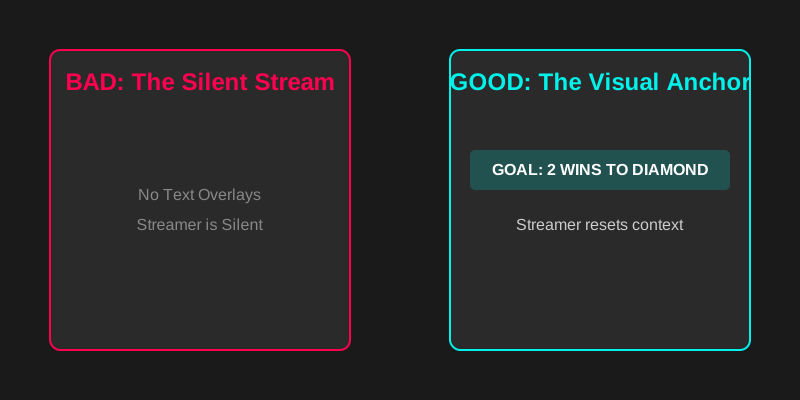
Visual Anchor vs. Silent Stream: Why visual context is more important for retention than gaming skill.
Examples of Bad vs. Good Anchors
- Bad: "Live Gaming" (Useless information)
- Bad: "Follow for more" (Begging)
- Good: "Ranked: 2 Wins to Diamond" (Stakes)
- Good: "If I lose, I eat a hot pepper" (Consequence)
- Good: "Speedrun: PB is 14:02" (Goal)
Action Step: Add a text source in OBS right now. Make it large, readable, and update it every session.
Strategy 2: The "Welcome Trap"
Many streamers make the mistake of calling out every person who joins.
"Welcome user123! Welcome gamer456! Welcome..."
Why this fails:
- It interrupts your content flow.
- It puts pressure on lurkers (who hate being perceived).
- It sounds robotic.
The Fix: Ignore the "joined" alerts. Focus on the chatters. Talk to the game, not the door.
- Instead of: "Welcome everyone!"
- Say: "Oh my god, I almost died there. Did you see that jump?" This pulls the new viewer into the action, rather than stopping the action to greet them.
Strategy 3: The "Reset" Technique
TikTok is a revolving door. Every 60 seconds, your audience is completely new. You must "reset" the room constantly.
The Loop (Every 2-3 minutes):
- Summarize: "For those just joining, we are on a 5-win streak."
- State Goal: "We need one more win to hit Master rank."
- Call to Action: "Tap the screen if you think we can do it."
If you don't reset, new viewers feel like they walked into the middle of a movie and don't know the plot. They will leave.
Checklist: Fix Your Retention Today
- Overlay Audit: Does your stream have a text overlay explaining the current goal?
- Silence Check: Watch your own VOD. visual boredom? (If you are silent for >10s, you are losing viewers).
- Eye Contact: Is your camera at eye level? Are you looking at the lens, not just the monitor?
- Lighting: Is your face clearly visible? (Dark cams get scrolled instantly).
FAQ
Q: My game is fast-paced (Apex/CoD). How can I read chat? A: You don't need to read every message instantly. Group them. Play the round, then spend 30 seconds interacting during the lobby/loading screen. Use the "Reset" technique during these breaks.
Q: Should I use gameplay clips or my face as the main focus? A: On TikTok Live, your face is the retention hook. People stay for personalities, not just aim. Make your camera at least 20-25% of the screen, or use a "green screen" effect to put yourself over the gameplay.
Q: Does background music help? A: Yes. Silence is awkward. Use low-volume, copyright-free LoFi or synthwave. It fills the "dead air" when you are focusing.
Conclusion
Retention is not about being the best player. It's about being the most understandable streamer. If a stranger can look at your stream and know exactly what is going on within 3 seconds, you will win. Fix your "Visual Anchor," stop greeting the door, and reset the room. The views will follow.