
- Published on
TikTok Live Feels Pointless? You Are Stuck in the 'Bot Tier' (And How to Escape)
- Authors

- Name
- Robin
It feels pointless because you are invisible. But invisibility is a data problem, not a talent problem.
The "Pointless" Void: Why You Feel Invisible
You hit "Go Live." You wait. The viewer count hovers at 1. Then it jumps to 3 (bots). Then back to 0. You talk to yourself for an hour.
It feels pointless because, functionally, it is.
If TikTok's algorithm doesn't know what you are, it won't show you to anyone. Unlike Twitch, where you can grind discoverability through browsing categories, TikTok is purely algorithmic. If the algorithm can't label you, you don't exist.
You aren't shadowbanned. You are Unclassified.
The "Bot Tier" Trap
When a new or struggling account goes live, TikTok puts it in a holding pattern I call the "Bot Tier."
- The Test: TikTok sends a tiny trickle of traffic (often bots or accidental swipes) to sample your stream.
- The Signal: It looks for immediate categorization signals (What game? What language? Is there a face? Is there talking?).
- The Failure: If you are sitting silently in a lobby, or your lighting is bad, or your title is generic ("Chilling"), the AI gets Zero Signal.
- The Drop: Because it can't categorize you, it stops sending traffic to protect the user experience.
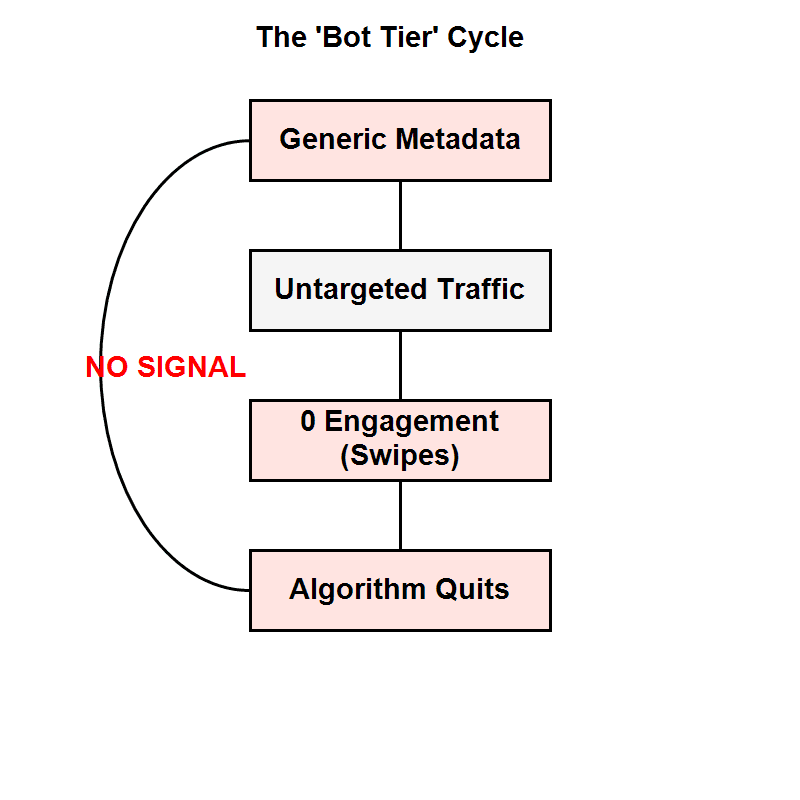
The Bot Tier Cycle: How generic metadata creates a feedback loop of zero traffic.
How to Escape: The Classification Protocol
To make streaming feel "meaningful" (i.e., to get actual humans in chat), you need to force the algorithm to classify you.
1. Metadata Specificity (The "Niche" Hook)
Stop using generic tags like #gaming or #chill. These are useless. You are competing with 50,000 other people.
- Bad: Title: "Fortnite Chill Stream" | Tag: Gaming
- Good: Title: "Ranked Zero Build - Road to Diamond" | Tag: Fortnite
Specific metadata tells the algorithm exactly who to fetch. It's better to have 50 viewers who love Ranked Fortnite than 0 viewers from the "Gaming" bucket.
2. The "3-Second" Audio Rule
The algorithm listens. If you are silent for the first 30 seconds of a viewer joining, they swipe. If they swipe, the algorithm thinks your stream is boring.
The Fix: Narrate constantly, even to 0 viewers. "Okay, rotating to the safe zone, checking corners..." The AI picks up the constant speech patterns and categorizes you as "Active/Engaging."
3. Visual Contrast
If your stream looks dark, grainy, or static (just a game menu), the AI visual recognition fails.
- Use a bright overlay or border.
- Ensure your face cam (if you use one) is well-lit.
- Never stay on a "Starting Soon" screen for more than 2 minutes. TikTok hates static screens.
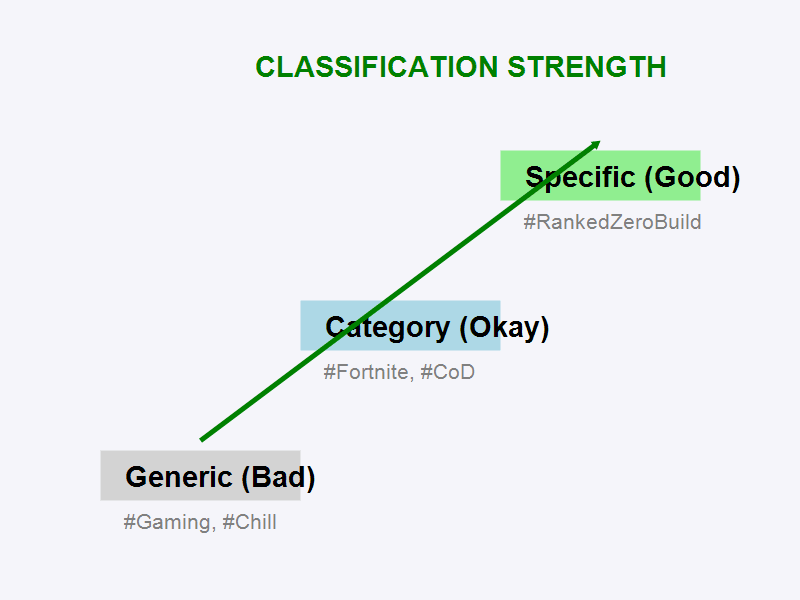
The Classification Ladder: Moving from "Invisible" to "Targeted" using specific signals.
Reality Check: Is It Actually Pointless?
If you make these changes—specific tags, constant narration, bright visuals—and you still have 0 viewers after 5 streams... then yes, your current content strategy might be pointless.
But usually, it's not the content that's the problem. It's the packaging.
TikTok Live is a search engine. You have to give it the keywords to find you. Once you break the "Bot Tier," the feeling of pointlessness vanishes because you finally get that first real chat message: "W play."
And that one message makes it all worth it.
Summary Checklist
- Title: Is it specific? (Game + Goal)
- Audio: Are you talking before someone chats?
- Visual: Is the screen bright and moving?
- Consistency: Did you stream for at least 60 minutes? (Discovery takes time to ramp up).